Skip to content

arbren

AI consulting for small firms, especially tax, accounting and insurance. Anywhere over Zoom or Teams.

Scroll

What Arbren covers:

  • Claude Code setup
  • Codex setup
  • Choosing a plan
  • Client-data rules
  • Skills and connections
  • Staff training
  • Automation
  • Dashboards
  • Security setup
  • Ongoing help

AI and technology consulting

Pick the right AI, set it up safely, and put it to work on your own documents.

Arbren is Caleb Smit. He helps you choose the right AI, set it up on your own documents with clear rules for client data, and build what's worth building.

Tools we set up, secure and train on

  • Claude
  • Claude Code
  • ChatGPT
  • Codex
  • Microsoft Copilot
  • Power Automate
  • n8n
  • Cloudflare
  • Azure
  • Google Workspace

What we do together

Four ways to work together. Start with a conversation.

  • 60 to 90 minutes

    AI briefing

    What AI can do for your business, shown live in a real workspace.

    • Claude, ChatGPT and Copilot compared
    • A written plan: three moves, costs and dates
  • Half day or full day

    Workspace setup

    Claude Code or Codex set up on your computers, pointed at your own documents.

    • Installed safely
    • Files organized with a table of contents
    • Rules and skills that keep it learning
  • Scoped per project

    Build

    A dashboard, automation or connection made for your business, with checks built in.

    • Agreed in writing first
    • Handed over with instructions
  • Monthly

    Ongoing help

    New skills and connections as your work changes, and new staff brought up to speed.

    • Settings and security kept current

Every engagement is agreed in writing first. Over Zoom or Teams anywhere, or on site at your office.

See what a written plan looks like

Guides

Prices, rules and setup, checked November 2026. Seven guides, one search.

Seven short guides with a summary at the top of each, or search every answer on the site.

AI readiness check

Where does your company stand?

Five questions, about a minute. You get a score, a read on where you are, and the best place to start. A conversation starter, not an audit: nothing you choose leaves this page unless you send it.

Question 1 / 5

Where does your company's information live?

About

One person, hands-on with the tools you'll use.

Arbren is Caleb Smit: you work with him directly, from first call to finished setup. He has spent more than 4,000 hours building with AI tools and uses the same ones he recommends. Based in Minnesota, with roots in Iowa, working anywhere over Zoom or Teams.

4,000+

hours hands-on with AI tools

Caleb Smit

Founder, Arbren

Sets up and trains on

  • Claude Team and Enterprise

    Anthropic

  • ChatGPT Business

    OpenAI

  • Microsoft Copilot

    Microsoft

  • Power Automate and n8n

    Automation

Recognition

Caleb Smit, founder of Arbren, in a navy check blazer against a dark textured wall
Caleb SmitFounder, Arbren
Based in Minnesota
arbren — session

arbren session --company yours. reading your folders, done. writing CLAUDE.md, done. adding skills and connections, done. checking the gates, done. workspace ready · next: your first task

Selected work

Built with the same tools he recommends. Live projects you can open and try.

Projects Caleb designed and built with AI coding agents, all running today.

01 · Financial analytics dashboard

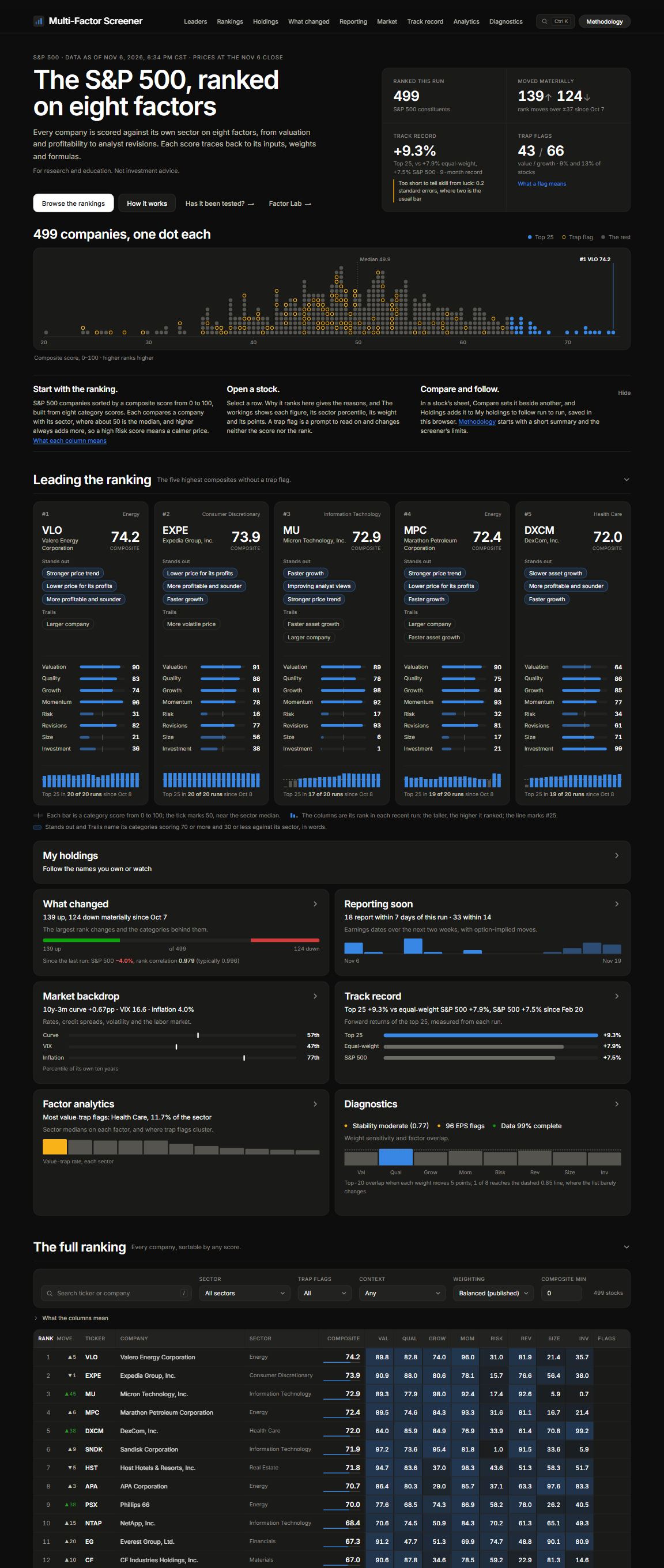
Multi-Factor Stock Screener

Scores every company in the S&P 500 on eight factors, ranks them, and shows the arithmetic behind each score. It refreshes every weekday morning, with a research page that tests the ranking against 2012 to 2026 history, failures included.

  • Python
  • S&P 500 data
  • Daily automated refresh

Questions

What clients usually ask first. Search finds the rest.

Do we need a technical team to work with you?

No. You work in plain English and Caleb does the setup. If you have an IT provider, he brings them in before anything is installed on a company computer.

Who will we work with?

Caleb, every time. Arbren is one person: whoever you talk to on the first call does the setup, the build and the follow-up.

Where should a business like ours start?

With one repetitive task that eats a few hours a week: routine email, meeting notes, quotes, document summaries. Give a small group a business-grade tool, set simple rules for what information can go in, and measure the time saved over a month. Keep what works and drop what does not. The industry guide shows the starting point we would pick for yours.

Which is best: Claude, ChatGPT or Copilot?

We recommend Claude first: it is the strongest at long documents, careful writing and analysis, and it includes Claude Code, which works through folders of your documents. ChatGPT Business is a strong second, with the broadest toolbox including images and voice. Microsoft Copilot is the easiest choice for an office that lives in Outlook and Teams. The Which AI guide has prices, usage limits and a plan finder.

Is the free version good enough?

For trying things out on your own, yes. For company or client information, no. Business plans give you an admin console, let you remove access when someone leaves, and come with contract terms that keep your data out of model training. A business seat usually costs about the same as a personal subscription.

Can we put client or patient information in?

In a business plan like Claude Team or ChatGPT Business: client files, financials, policies and contracts, yes. Full SSNs, bank, account and card numbers, and health information stay out; use the last four or a client code. Patient information needs an Enterprise plan with a signed business associate agreement, and tax return information falls under Section 7216. Caleb writes down what can go where so your team never has to guess.

Are there state AI laws we need to follow?

Usually not for an ordinary business using these tools. Minnesota and Iowa, the states we cover in depth, have no general AI law for that; Iowa's 2026 chatbot law, which starts July 1, 2027, targets companion-style chatbots and excludes business customer-service and internal tools. A few states, like Colorado and California, go further, and we check yours. What always applies are the rules you already know: privacy, healthcare, insurance, banking, open records and professional ethics. Announce an AI notetaker on calls, since some states require everyone's consent to record. Your attorney confirms the specifics.

How accurate is it? Can we trust what it says?

AI is very good at drafting, summarizing and organizing, and it still gets specific facts, figures and citations wrong, especially ones you did not give it. Give it your source material, ask it to show where answers come from, and have a person check anything that leaves the building. Your business stays responsible for what it sends.

Do we need an AI policy?

Yes, and it can be two pages. Your team is probably already using AI on personal accounts, and a policy turns that into clear rules: which tools are approved, what information is off limits, who reviews anything that goes to a customer, and who to ask. We write it with you and train people on it.

What do the AI tools cost?

A business AI seat runs $20 to $25 per person per month, and you may already have some AI included in Microsoft 365 or Google Workspace. The bigger investment is setup and training time, so we start with a small pilot and measure the return before you scale. At $20 a seat and $45 an hour of staff time, a seat pays for itself if it saves about 6 minutes a week; the Which AI guide has a calculator for your numbers. The Stacks guide prices three complete setups for any team size.

Start a conversation

Let's talk about where AI fits in your business.

Tell us a little about your company and what you are hoping AI can do. Caleb replies within one business day to set up a call.

What happens next

  1. 1

    You send a short note about your company and goals.

  2. 2

    Caleb sets up a short call at a time that suits you.

  3. 3

    You get a written proposal: what Caleb will do, and by when.